Project and application management: Unterschied zwischen den Versionen
Zur Navigation springen
Zur Suche springen
Keine Bearbeitungszusammenfassung |
Hsboot (Diskussion | Beiträge) Keine Bearbeitungszusammenfassung |
||
| Zeile 44: | Zeile 44: | ||
<!-- Do not write text below this tag --> | <!-- Do not write text below this tag --> | ||
<br class="iwlinks"/>[[pl:Zarządzanie projektami | <br class="iwlinks"/>[[pl:Zarządzanie projektami|Zarządzanie projektami]][[en:Project management|Project management]][[it:Gestione progetti e software|Gestione progetti e software]][[zh-cn:项目和应用管理|项目和应用管理]][[bg:Управление на проект и приложение|Управление на проект и приложение]] | ||
Version vom 23. Februar 2026, 16:03 Uhr
| Produkt | InstalSystem 5 |
| Art des Artikels | FUNCTION AND TOOL |
| Aktuell für Version | 2018-01-03 |
Description
This article describes managing projects by means of the InstalSystem Manager. It also shows how to open and create projects in various program versions depending on the user's needs.
Location in the program
Creating new projects and openining existing projects
- Create new project/Open existing project is accessible in the InstalSystem 5 Manager window:
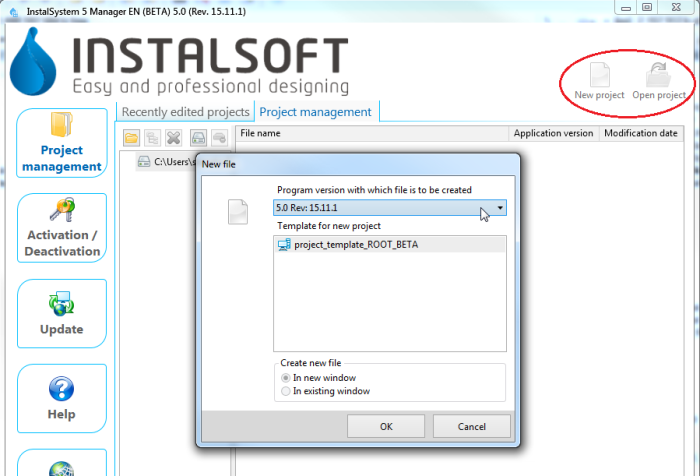
1. New project/open project in InstalSystem 5 Manager and in InstalSystem 5 Editor:
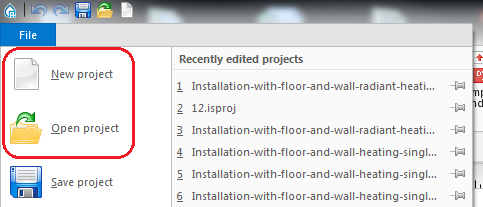
2. New project/open project in InstalSystem 5 Editor


Managing project files and additional files
- List of recently edited projects is accessible in the InstalSystem 5 Manager window:
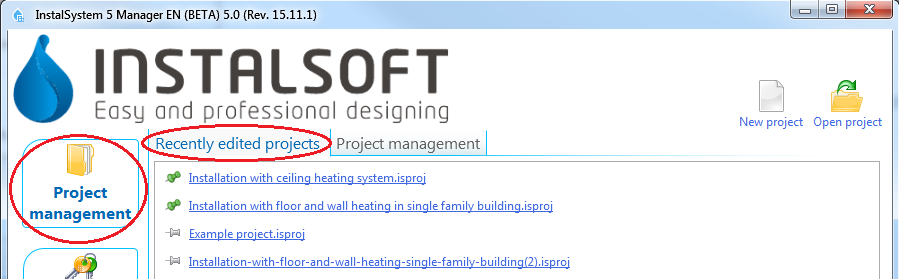
3. Recently edited projects in InstalSystem 5 Manager
and in InstalSystem 5 Editor.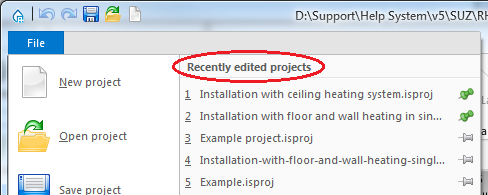
4. Recently edited projects in InstalSystem 5 Editor - Project management is accessible in the Project Management tab in the InstalSystem Manager 5 window:
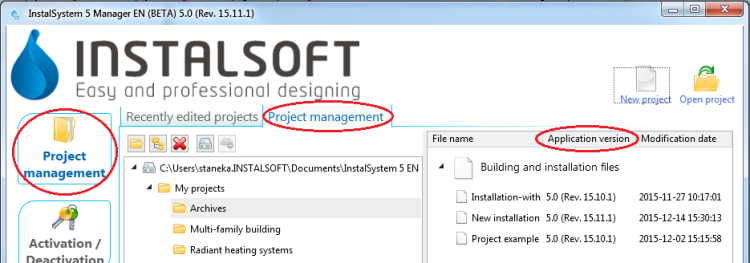
5. Project management in InstalSystem 5 Manager


Examples of use
Creating new projects and openining existing projects
- New project - when creating a new project it is possible to indicate one of the downloaded subversions of the program. The most recent subversion is indicated by default. When a new file is created, a template can be selected for use in the project.
For more information, see: Template files. - Existing file - when opening an existing project file, a program subversion can be selected to be used for further file processing. This enables carrying on the project using the program version with which the project was created.
The InstalSystem 5 package also enables loading files created with InstalSystem 4.
Managing project files and additional files
- Recently edited projects - this list is created automatically, it facilitates access to recently edited files, irrespective of their location.
Selected projects can be placed at the top of the list irrespective of the date of the most recent processing. This is done with the use of a tack - clicking the pin beside the selected project makes it stay on the top of the list
  .
. - Project management - When installing the program, default location for projects can be selected. It is recommended that each project (object being designed) has a dedicated subfolder where the various InstalSystem project versions (files with .isproj extension) and other additional files, e.g. base drawings used, will be stored. Another advantage is that the package version with which the file was developed is displayed for .isproj files.

